NYC web content style guide
Jump to section
Specific words and phrases
Rules for how to use common words and phrases. View full list
Foundations
About this guide
This is a guide to writing content for official NYC government websites. By following these guidelines, writers will help make NYC government content easy to understand, accessible, trustworthy, and consistent.
This guide is one part of the NYC Digital Design System, which also includes visual design and engineering guidelines.
Follow these guidelines whenever you write for nyc.gov. You should also follow them when you write for any other public-facing NYC government websites or applications.
Why should I follow these guidelines?
If your website is supported by the Office of Technology and Innovation (OTI), you’re required to follow these guidelines.
These guidelines also align with Local Law 30 of 2017 [PDF] to facilitate effective language access. Among other things, the law requires covered agencies to use plain language for “documents most commonly distributed to the public that contain or elicit important and necessary information regarding the provision of basic city services and for other public communications.”
Most importantly, following these guidelines helps New Yorkers.
How should I use it?
We recommend reading this guide all the way through. Then, bookmark this page for quick reference while you’re writing content. Use the jump links to navigate to specific sections.
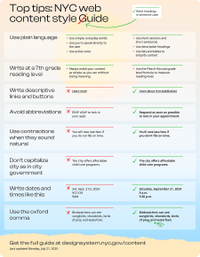
You can also download and print a poster featuring the most important guidance.
Download tabloid size poster [PDF]
Download letter size poster [PDF]
Acknowledgments
This guide is based in part on the 18F Content Guide by 18F, the former digital service team within the federal General Services Administration. Plain language guidance is based on the federal plain language guidelines. We referenced the AP Stylebook, 57th Edition for style rules.
Feedback
We encourage NYC government employees to contact us with questions or feedback.
Rights
This guide is an open-source document. Feel free to copy, change, and reproduce this guide to suit the needs of your organization.
Content principles
As government writers, we have a responsibility to our users. It’s on us to do the hard work to make content better. Users shouldn’t have to work hard to find, read, or understand our content.
By following these five principles, we can write content that works better for New Yorkers.
For users, not for government
Always start with real user needs
Write action-oriented content that helps users get things done
Never include information that only government users care about
Structure content by how users actually think about a topic
Easy to understand
Use plain language and simple sentences
Prioritize clarity over sharing every detail
Put content where users expect to find it
Accessible
Meet WCAG 2.2 accessibility standards so the content is accessible to users with disabilities
Write as simply as possible without losing meaning
Write content that is easily translated into non-English languages
Make sure content is readable on mobile devices
Use web-based content instead of PDFs or images containing text
Trustworthy
Update content often
Make sure information is accurate
Use natural language instead of jargon
Consistent
Follow the web content style guide
Use similar structure and layouts for similar pages
Don’t call the same thing by many different names
Plain language
All public-facing content on nyc.gov should be written in plain language. Plain language means your audience should understand your writing the first time they read or hear it.
The most common techniques for writing in plain language are:
Use simple, everyday language
Avoid jargon
Use "you" to speak directly to the user
Use active voice
Use the simplest tense possible (usually present tense)
Use as few words as possible
Avoid idioms and turns of phrase
Use short sections
Use short sentences
Present each topic or point separately
Order content in a logical, intuitive way
Use descriptive headings
Use lists and tables to simplify complex content
Use links that describe what the user will get when they click
The NYC Service Design Studio offers videos and printable guides to writing in plain language.
Plain language techniques are also described in depth at plainlanguage.gov.
Reading level
Always make your content as simple as you can without losing meaning. Try to simplify your content to a seventh grade reading level or lower.
We use the Flesch–Kincaid grade level formula. You can use Microsoft Word, Hemingway, or another tool to check Flesch–Kincaid grade level. While this formula isn’t perfect, it’s good enough to flag passages that should be simplified.
There will be times when you can’t achieve a seventh grade reading level. In these cases, try to reduce the grade level as much as possible using plain language techniques. Frame more complex passages with simple sentences to help users find the information they need.
Speak to the user
Address the user as you.
If you have multiple distinct audiences, address the primary user as you and refer to secondary users by their roles or titles.
You may refer to the speaker as we if it’s clear which group (team, agency, the government) we refers to. But it’s usually better to focus on the user rather than the speaker. For example:
You must submit your application by June 1, 2025.
We require that you submit your application by June 1, 2025.
Voice
Our voice is:
Authoritative: We sound credible and well-informed. Users can rely on our content to be accurate and trustworthy.
Clear: We speak directly to our users’ needs with concise, task-oriented content that’s easy to understand.
Human: We sound helpful, friendly, and empathetic. Our language is natural and conversational.
Inclusive: We speak to everyone. Our content empowers people by using language that makes them feel seen and respected.
Our voice is not:
Didactic: Our content serves to inform and guide. We don’t sound morally superior or patronizing.
Cold: We avoid overly formal or impersonal language that could come across as robotic or bureaucratic.
Nonchalant: We take our users seriously and don’t use jokes, idioms, or trendy language that could be alienating.
Opinionated: We deal in facts and don’t take sides on issues without clear evidence.
Generative artificial intelligence (AI) tools
Generative AI tools can be helpful for writing and editing content.
In general, it’s OK to use generative AI tools for writing and editing content as long as:
The software has been approved for use by the Office of Technology and Innovation (OTI).
The content you’re working on is public-facing and does not contain sensitive or restricted information
Note that there are specific policies governing the use of AI in city government. You can find more information on the OTI website.
Be careful when using generative AI tools. Generative AI often writes misleading or inaccurate content. It’s important that you have a human editor review any AI-generated content before publishing it online.
AI-generated content should be checked for:
Accuracy
Missing information
Use of plain language
Seventh grade reading level
Compliance with the style rules in this guide
You should also disclose the use of generative AI to your audience. If you’re writing content for nyc.gov, the about our content page linked in the footer discusses the use of generative AI for editing.
Style rules
Follow these rules for all public-facing web content. If a rule isn’t explicitly covered in this guide, use AP style.
AP Stylebook
Copies of AP Stylebook ebooks are available for NYC government employees. Contact us to request a copy.
Abbreviations
In general, avoid abbreviations that shorten or truncate terms (such as appt or gov’t).
Exceptions:
When the abbreviation is more common than the longer term (such as email for electronic mail)
St., Ave., Pl., and other street suffixes in addresses
Info is acceptable as a shortening of information
ID is acceptable as a shortening of identification
See also: Acronyms
Acronyms
Use acronyms sparingly. The full phrase is usually clearer, even if it makes the text longer.
If you use an acronym, define it the first time you use it on that page. Define it by writing out the full term followed by the acronym in parentheses.
The Department of Finance (DOF) collects parking ticket fines.
On very long pages that the user may not read top to bottom, define the acronym once per section. Users shouldn't have to hunt for acronym definitions.
When to use acronyms (with definitions in the first usage):
If the full term is long and used often in the content, such as an agency name
If the acronym is more familiar to users than the full term, such as SNAP
You don’t need to define these common acronyms:
a.m. and p.m.
NYC
PDF
PIN
ZIP code
Never use the following acronyms:
ASAP (use as soon as possible)
DIY (use do it yourself)
RSVP (avoid)
FYI (avoid)
a.k.a. (use also known as)
e.g. and i.e. (use for example or such as)
etc. (avoid)
Don’t give every new product, program, or initiative an acronym. They often make things harder to remember, not easier.
It’s a common mistake to capitalize the first letters of phrases that appear in acronyms. Only capitalize the phrase if it’s a proper noun or falls under another capitalization rule.
Many people with a sexually transmitted infection (STI) have no signs or symptoms.
Many people with a Sexually Transmitted Infection (STI) have no signs or symptoms.
Active voice
Write in the active voice unless you have a good reason not to.
Active voice means the subject of the sentence is the person or thing doing the action. It’s the opposite of passive voice, in which the subject is having something done to it.
You must submit the form.
The form must be submitted.
Save the case number for your records.
The case number should be saved in your records
In the active voice, it’s always clear who is doing the action. This can be tricky, especially with verbs like require. For example:
DSNY requires that you place your trash out after 6 p.m.
You’re required to place your trash out after 6 p.m.
We can try changing the sentence to focus on what's important and keep it in the active voice. This usually results in clearer writing.
You must place your trash out after 6 p.m.
When to use the passive voice
There are a few good reasons not to use the active voice.
To soften the tone of an error message:
Your documents were not uploaded correctly.
You didn’t upload your documents correctly.
To omit unnecessary details:
We’re not allowed to collect personal information online.
Local law prevents us from collecting personal information online.
Brand names
It’s important to distinguish brand names from other names. That’s because brand names are usually capitalized while website and application names are not.
A name may be a brand name if it:
Is a registered trademark
Is used in marketing or promotional materials
Has an associated logo
Is associated with a range of different products
Is not simply a description of the product
Examples of brands in NYC government include 311, CityStore, and Open Data. Examples of products that are not branded include property information portal, tree map, and vaccine finder.
Non-government brand names
Avoid using brand names when there’s a generic alternative. For example:
Band-Aid (use adhesive bandage)
Q-Tips (use cotton swabs)
Xerox (use copy)
iPhone (use smartphone)
Be careful not to endorse a specific brand or product. When writing about brands or products, mention a range of companies instead of a single provider. For example:
Flu shots are available at CVS, Rite Aid, Walgreens, Duane Reade, and many independent pharmacies.
Flu shots are available at places like CVS.
Buttons
Generally, buttons are for doing something and links are for going somewhere.
Use buttons to encourage the user to take action online.
Examples of actions include:
Beginning an online transaction
Submitting information
Accessing an application
Applying changes in a menu
Viewing a specific piece of information
Write button text that makes it clear what will happen when the user clicks. Avoid vague buttons.
Write all buttons in sentence case. Be sure to follow all other capitalization rules. Don’t include punctuation.
Contractions
Use contractions (such as can’t, don’t, and they’re).
Contractions make writing friendlier and increase readability. You don’t need to use them in all cases, just wherever they sound natural.
Capitalization
Be careful with capitalization. Government writing is often over-capitalized, which can imply formality where it doesn't exist. Capitalization is not a signal of respect or rank. It's simply a way to help readers understand content.
If you have a specific question about whether something should be capitalized, refer to AP style rules.
General rules:
Capitalize proper nouns, including names of individuals, places, agencies, programs, and official documents.
Capitalize the first letters of sentences and list items.
Write headings, buttons, and links in sentence case (not title case).
Only use all capital letters for acronyms or stylized brand names. Never use all caps for emphasis.
Don’t capitalize:
Titles or offices unless they come immediately before a name: President Abraham Lincoln. The president visited New York.
city or government in contexts like city government, city officials, government agencies
Web domains: nyc.gov, usa.gov
The names of products or applications, unless they are a brand name
The word program if it is not part of the official program name: Free Summer Meals program
See also: Headings, Names and titles, Specific words and phrases
Dates and times
When writing dates:
Use the format Weekday, Month Day, Year: Saturday, September 21, 2024
Exclude the weekday or year if it isn’t necessary in context
Never abbreviate the month (as in Sept.) or day of the week (as in Wed.)
Always use the four-digit year (2025 not 25)
Don’t use ordinals (21 not 21st, 5 not 5th)
Examples:
Saturday, September 21, 2024
September 21, 2024
September 21
Sat. Sept. 21, 2024
Saturday, September 21st, 2024
9/21/24
21/9/24
When writing times:
Use a 12-hour clock, with a.m. or p.m. following the time after a space: 10:15 a.m.
For times on the hour, just use the hour: 9 a.m.
You may use noon or midnight instead of 12 a.m or 12 p.m. to avoid confusion.
All times on nyc.gov are assumed to be in Eastern time. Specify the time zone only if it isn’t EST or EDT.
Examples:
9 a.m.
5:30 p.m.
noon
17:30
9AM
Date and time ranges
When writing a time or date range, it’s usually clearer to use the word to instead of a hyphen or dash. To is inclusive, meaning the range includes the starting and ending date or time. Don’t use through.
9:00 a.m. to 3:00 p.m.
September 21 to 22, 2024
Emojis
Don’t use emojis.
Emojis have built-in alternative text, making them accessible for screen readers. However, their alternative text can disrupt the reading experience for screen reader users or unintentionally shift the tone of your content.
Frequently asked questions
Frequently asked questions (FAQ) can be a useful way to organize dense information. But they can also be frustrating for users to navigate.
To write better FAQ, follow these guidelines:
Don’t bury the most important information in FAQ.
Reserve FAQ for information that only applies to some users.
Write questions that users are really asking.
Don’t repeat information from other pages inside FAQ. Link to those pages in the main content instead.
Include seven or fewer FAQ per page.
Favor writing out frequently asked questions rather than FAQ. If you must use the term FAQ, treat it like any other acronym.
Headings
Write all headings in sentence case. Be sure to follow all other capitalization rules.
Parking and camera tickets
Department of Finance careers
How to apply
Parking and Camera Tickets
Department of Finance Careers
How to Apply
Don’t include punctuation (such as colons, periods, exclamation points, or ellipses) in headings. The exception is question marks when the heading is a question.
Pay your ticket
What happens if I don’t pay my ticket?
Parking ticket information:
Pay your ticket.
Headings are primarily used for wayfinding and are critical for accessibility. Write simple, descriptive headings that include keywords to help users find the information they’re looking for.
Lithium-ion battery safety
Sounding the alarm on battery safety
Headings should be concise. Headings that are too long make content difficult to scan.
Eligibility
Determine your eligibility for this program
Heading styles are used to communicate the content hierarchy. We use heading styles H1, H2, H3, and H4 on nyc.gov.
H1 is used for the title or primary headline of the page. There is usually only one H1 per page.
H2s are used for section headers.
H3s and H4s are used to break up content beneath H2s.
Heading styles should always nest in order from largest to smallest (H1, H2, H3, H4) and should not be skipped.
Inclusive language
Inclusive language helps us build trust with our users. In general, write in a welcoming tone and avoid language that alienates specific groups of people.
Ability and disability
The Mayor’s Office for People with Disabilities (MOPD) publishes a disability-inclusive terminology guide with specific words and phrases to use and avoid.
Age
The term older adult is more inclusive than senior, senior citizen, or elderly.
Criminal justice
Avoid terms that define people based on their interactions with the criminal justice system. For example:
Use incarcerated person or person in custody instead of inmate or prisoner.
Use person convicted of a crime instead of convict or criminal.
For more detailed guidance, see the National Institute of Justice Style Guide.
Gender and sexuality
Make content gender-neutral wherever possible.
Specific guidelines:
If you don’t know a person’s pronouns, use they, them, and their (never he/she, he or she).
When speaking generally, use spouse or partner instead of husband or wife.
When speaking generally, use parent instead of mother or father.
Use different sex instead of opposite sex.
For more detailed guidance, see the GLAAD Media Reference Guide.
Nationality and immigration
Avoid using citizen as a generic term. New York City is home to many non-citizens and people with a wide range of immigration and visa statuses.
Use resident or New Yorker instead of citizen.
Use older adult instead of senior citizen.
When discussing immigration status, use undocumented immigrant instead of illegal immigrant.
Race, ethnicity, and religion
Avoid using language that reinforces racial, ethnic, or religious stereotypes.
Avoid the term non-white and other terms that treat whiteness as a default.
When referring to a person’s race or ethnicity, use adjectives, not nouns (for example, an Asian person, not an Asian).
Media style guides for race, ethnicity, and religion:
Links
Generally, links are for going somewhere and buttons are for doing something.
Write link text that makes it clear what will happen when the user clicks. Name or describe the site, page, or document you’re linking to. It’s also helpful to include an action verb, especially for links that stand alone.
The NYC Rent Guidelines Board decides how much rent can go up for rent stabilized units.
Contact the NYCHA Customer Contact Center for more information.
It’s best practice to use consistent link text for different links that go to the same destination.
Standalone links are set apart from other body text. They don’t need punctuation. They should be written in sentence case. Be sure to follow all other capitalization rules.
We do not use external link icons. If a link goes to a site that is not owned by NYC government, use text that describes where it goes.
Avoid the term click here. It’s unnecessary and doesn’t make sense on mobile devices.
To hyperlink an email or phone number, write out the whole email address or phone number.
Dial (212) 639-9675
Email us at exampleemail@oti.nyc.gov
Set links to open in the same tab or window. Links should not be set to open in a new tab or window except in very specific circumstances.
Avoid linking to PDFs or spreadsheets unless there is no web-based version of the content. If you must link to a file, tell the user what kind of file to expect. For links in body text, this can be handled in context.
You can also view a PDF of the IT-2 form.
For standalone links to files, add the file type in brackets at the end. For links to files larger than 100 MB, add the file size as well.
Use this format: document name [file type, size]
Lists
Bulleted lists make content easier to read and navigate. Use them in most cases where you’re listing three or more items.
To ensure the list is accessible, use the list tools in your content management system to generate an HTML list. Don’t create a list by adding symbols or numbers before plain text.
On our website, you can:
Check the status of your ticket
Check whether your vehicle has other tickets
See the total amount you owe
Get a copy of your parking ticket
You can check the status of your ticket, check whether your vehicle has other tickets, see the total amount you owe, or get a copy of your parking ticket on our website.
Use a colon to lead into the list. Capitalize the first word of every bullet point. Don't use semicolons after list items. Only put a period at the end of the list item if it's a complete sentence.
The Department of Finance collects:
Business taxes
Property taxes
Parking ticket fines
Before you submit this form:
Check that your personal information is correct.
Check that your documents were uploaded correctly.
List items should be concise. If list items are stretching onto three or more lines, consider breaking up the content.
All of the items in a single list should be phrased similarly. If one item is a question, the other items should be questions. If one item starts with a verb, the other items should start with verbs.
Include in your report the vehicle's:
Color
Make
Model
License plate number
Include in your report:
Vehicle make
Model
The color of the vehicle
What’s the license plate number?
Lists with conjunctions
It can be helpful to add conjunctions (such as and, or) to a list. This is especially true when listing requirements, such as eligibility requirements for a benefit program.
When adding conjunctions to a list, separate them by a comma and make the conjunction bold.
To be eligible, all of the following must be true:
You’re 62 or older, and
Your name is on your lease, and
Your combined household income is less than $50,000 per year
And at least one of the following must be true:
You live in a rent stabilized apartment, or
You live in a Mitchell-Lama development, or
You live in a rent regulated hotel or single room occupancy unit
Multi-level lists
Lists can include up to two levels. Lists deeper than two levels become difficult to read, especially on mobile devices.
You will need the following documents to do your 2024 taxes:
- Government-issued photo ID, such as a driver's license, IDNYC card, or passport
- Your 2023 tax return, if available
- Income statements or forms, including:
- Form W-2 (wages from each job)
- Form 1099-G if you received unemployment insurance at any point during 2024
- Form SSA-1099 (Social Security benefits)
- Form 1099-INT (interest)
Numbered lists
Only use numbered lists if the list items are really in sequence.
How does applying work?
You request a hearing and submit evidence.
An administrative judge reviews your case and decides whether to dismiss your ticket.
If your ticket is dismissed, you do not have to pay.
If your ticket is not dismissed, you’ll have to pay the fine and any penalties charged before you requested a hearing.
You may use any of the following forms of ID:
Social Security card
Driver’s license
Non-driver ID card
Names and titles
When writing about a specific person, use their full name the first time you refer to them. On second reference, use first names when writing informal content (such as an employee profile) and last names for more formal content (such as a press release).
When writing a person’s title, only capitalize it if it appears immediately before their name.
President Abraham Lincoln
President Lincoln
The president visited New York
The president, Abraham Lincoln, visited New York
Many NYC government titles are used to refer to both an individual and their office or department. In these cases, the personal title should be lowercase (except as described above), and the organization name should be capitalized.
The mayor issued a statement. Contact the Mayor’s Office for more information.
See also: Organization names
Numbers
In general, we follow AP style rules for writing numbers. But the AP rules are complex and include dozens of exceptions. If you’re not already familiar with AP style, this simplified guidance will be good enough.
In most cases, spell out the numbers zero through nine and use numerals for numbers 10 and greater.
In some cases, you should always use numerals instead of spelling out the number. These are:
- Addresses
- Ages
- Dates and times
- Measurements (such as length, volume, or weight measurements)
- Numbers in headings and buttons
- Numbers in tables
- Sequences (Step 2, Phase 5)
For example:
We’ll email your results in seven to 10 days.
This program is for children ages 2 to 5.
The sign must be posted within 5 feet of your front entrance.
1 Police Plaza
Currency
When referring to amounts of money in U.S. dollars less than $1 or greater than $1 million, use numerals followed by words.
5 cents
$2.7 million
For amounts of money in U.S. dollars less than $1 million, just use the dollar sign.
$17
$12.99
Percentages
Write percentages using a % sign with a number.
The budget increased 5%
Ranges
When writing a range, it’s usually clearer to use the word to instead of a dash. If you must use a dash, use a hyphen (-) rather than an en (–) or em (—) dash.
18 to 21 years old
18-21 years old
See also: Dates and times
Meta titles and descriptions
Meta titles and descriptions affect how a page shows up in search results.
Use title case for a page’s meta title. Include the name of the website after a hyphen. Keep titles under 60 characters when possible.
Write a meta description for every page. Tell users what to expect and summarize the page content. The description should be 120 to 160 characters.

Organization names
Capitalize the names of organizations when referring to a specific organization. Use lowercase when referring to a general concept or multiple organizations by their type.
The Department of Environmental Protection is a New York City agency.
Queens Community Board 2 is one of 59 community boards in NYC. The Community Board meets...
Simplified and inverted organization names keep their capitalization. For example:
the Office of the Mayor, the Mayor’s Office
NYC Parks, the Parks Department, the Department of Parks and Recreation
When referring to an organization by pronoun, use they or them, not it.
The Department of Design and Construction (DDC) distributes notifications when they plan a water shutdown.
The Department of Design and Construction (DDC) distributes notifications when it plans a water shutdown.
See also: Names and titles
Phone numbers
Write phone numbers in this format: (212) 639-9675
For numbers that include words, use this format: 212-NEW-YORK (212-639-9675)
Prepositions
It’s fine to end a sentence with a preposition.
Punctuation
Ampersands and plus signs
Use and instead of an ampersand or plus sign, unless they’re part of an official title or company name.
Department of Health and Mental Hygiene
NYC Health + Hospitals
Colons
Within a paragraph, only capitalize the first word after a colon if what follows is a complete sentence.
Use colons to lead into lists.
Commas
We use the serial comma (sometimes called the Oxford comma). In a list of three or more, include a comma before the word and or or.
Healthy foods include fruits, vegetables, beans, nuts, and whole grains
Healthy foods include fruits, vegetables, beans, nuts and whole grains
Dashes
If you want to use dashes to offset a phrase, use em dashes (—) with a space on either side.
Healthy foods — especially ones you prepare at home — don’t have to be expensive.
But dashes usually add complexity. Consider rewriting sentences to not use dashes.
Healthy foods don’t have to be expensive. This is especially true for foods you prepare at home.
Quotation marks
When quoting a person speaking or writing, use quotation marks. This passage is correctly punctuated:
“I’m pleased to announce this new initiative,” said the mayor. “This is a great day for New York City.”
Semicolons
Avoid semicolons.
Spaces
Sentences should always be separated by a single space. Never two spaces.
Slashes
Don’t use the slash (/) symbol as a replacement for the word or. Replace it with words or commas.
Avoid the phrase and/or.
You may be eligible if you’re over 62 years old or have a disability.
You may be eligible if you’re over 62 years old and/or have a disability.
Tables
Use tables to organize data. Tables can also be used to make lists of multiple conditional statements easier to understand.
Big tables can be hard to read. Try to limit tables to four or fewer columns.
Here are some good examples of tables:
| Lease length | Increase |
|---|---|
| 1-year lease | 2.75% increase |
| 2-year lease | 5.25% increase |
| Time since violation | Penalty |
|---|---|
| Less than 30 days | None |
| 30 days | $10 |
| 60 days | $20, plus previous penalty |
| 90 days | $30, plus previous penalties |
| 100 days | Ticket entered into judgment |
| Family size | Monthly income | Yearly income |
|---|---|---|
| 2 | $6,156 | $73.869.56 |
| 3 | $7,604 | $91,250.63 |
| 4 | $9,053 | $108,631.70 |
| 5 | $10,501 | $126,012.77 |
Text alternatives
Text alternatives help blind and low vision users understand the meaning of images.
To meet accessibility standards, most images used on the web must have an appropriate text alternative. Images that are purely decorative must be hidden from screen reader users.
This guide from W3C provides information on when to use text alternatives and how to write them.
Text styles
All capitals
Only use all capital letters for acronyms or stylized brand names. Never use all caps for emphasis.
Bold
You may use bold text for emphasis. Limit use of bold text to short words or phrases, not entire paragraphs.
DOF will never send you a text message asking for your password.
If there is an earthquake, you should drop, cover, and hold on.
Italics
Don’t use italic text in web copy.
Strikethrough
Don’t use strikethrough text in web copy.
Underline
Don’t use underlines for emphasis. In web copy, underlines always indicate a link.
URLs
When setting a URL path for a specific page, start with the page title, then:
Replace spaces with hyphens
Omit articles (like a, an, the)
Set to all lowercase
/parking-and-camera-tickets-guide
Writing URLs in copy
Normally, you should use a descriptive link rather than writing out a URL.
If you must write out a URL, use all lowercase, even at the beginning of a sentence. Don’t include https:// or www.
nyc.gov is the New York City website.
NYC.gov is the New York City website.
Nyc.gov is the New York City website.
URL paths are case sensitive. If for some reason you’re writing out a full URL (including a domain and a path), check to make sure the path is correctly capitalized.
See also: Meta titles and descriptions
Specific words and phrases
Below are rules for how to use common words and phrases. The bold term shows the accepted form (capitalization, hyphenation, punctuation), with accompanying text explaining usage.